
Alt Image Text: The Missing Link in Your Digital Strategy
Every image you post—whether on your website, Instagram feed, or LinkedIn carousel—carries invisible potential. It's not just what people see that matters; it's what the algorithms read that determines your reach, rankings, and ROI. That hidden layer of information? Alt image text. And if you're skipping this step, you're essentially whispering your message into a void while your competitors shout into a megaphone.
Alt text (alternative text) is more than an accessibility checkbox. It's a strategic asset that tells search engines and social media algorithms exactly what your images contain, helping them serve your content to the right audiences at the right time. According to Search Engine Journal, proper alt text optimization makes your website stand a better chance of ranking in Google image searches—and Google Images drives millions of visitors monthly. Meanwhile, Instagram's algorithm uses alt text to understand your posts and improve discoverability, directly impacting your reach and engagement.
Yet despite its importance, most creators and businesses overlook alt text entirely. The result? Reduced visibility, missed growth opportunities, and content that never reaches its full potential. Let's change that.
Why Alt Text Is Your Secret Weapon for SEO

Think of alt text as a translator between your visual content and the digital systems that curate what people see online. Search engines like Google can't "see" images the way humans do. They rely on text-based signals—file names, captions, surrounding content, and especially alt text—to understand what an image depicts and whether it's relevant to a user's search query.
When you add descriptive, keyword-rich alt text to your website images, you're essentially handing Google a roadmap to your content. Research from Accessibility Checker confirms that alt text is a ranking factor for Google Images, which represents a major traffic source for many websites. Well-crafted alt text improves your content's relevance signals, increases the likelihood of appearing in image search results, and enhances overall page rankings.
But here's where it gets interesting: alt text doesn't just help Google. It also serves users with visual impairments who rely on screen readers to navigate the web. When your images include thoughtful descriptions, you're expanding your audience, demonstrating brand values around inclusivity, and creating a better user experience—all of which are indirect SEO benefits that Google's algorithm rewards.
The bottom line? Alt text bridges the gap between visual storytelling and algorithmic understanding. Without it, your images are invisible to the systems that determine whether your content gets discovered or buried.
Instagram, Carousels, and the Reach Problem

If you've ever wondered why your Instagram posts aren't getting the reach they deserve, alt text might be the culprit. Instagram's algorithm has evolved far beyond chronological feeds. It now uses sophisticated image recognition technology to categorize content, understand context, and decide which users should see your posts. And while Instagram's AI can automatically generate basic alt text, relying on auto-generated descriptions is like letting autocorrect write your marketing copy—it's functional but rarely optimal.
When you manually write alt text for Instagram posts, you're giving the algorithm precise information about your content. You're telling Instagram: "This image features luxury eyewear in a minimalist office setting" or "This carousel shows five steps for creating accessible social content." That specificity helps Instagram serve your post to users who have demonstrated interest in those exact topics, behaviors, or aesthetics.
According to insights from Hootsuite, adding custom alt text to Instagram posts improves content discoverability and increases the likelihood that your posts will appear in Explore pages and search results. Think of it as Instagram SEO. The more accurately you describe your images, the better Instagram understands your niche, and the more effectively it can connect your content with the right audience.
This matters especially for carousels. Each image in a carousel can have its own alt text, creating multiple opportunities to signal relevance to the algorithm. If you're posting a 10-slide carousel about social media strategy, you can describe each slide's specific focus—giving Instagram ten distinct data points instead of one generic auto-description. That granular information compounds your discoverability potential.
The takeaway? Skipping alt text on Instagram isn't just an accessibility miss—it's a growth bottleneck. You're essentially asking the algorithm to guess what your content is about, and algorithms don't guess generously.
How Algorithms "Read" Your Images
Here's something most marketers don't realize: social media platforms and search engines have become remarkably good at understanding images without any human input. Instagram, Facebook, Pinterest, and Google all use computer vision and machine learning to analyze visual content—identifying objects, faces, text, colors, settings, and even emotions.
But here's the catch: while these systems are impressive, they're not infallible. Automated image recognition can identify that your photo contains "a person, a table, and eyeglasses," but it can't tell whether you're showcasing a new product line, demonstrating a repair technique, or celebrating a customer testimonial. Context is everything, and context is exactly what alt text provides.
Research from UserWay emphasizes that alt text enriches algorithmic understanding by adding semantic meaning that pure visual analysis can't capture. When you write "luxury titanium eyewear frames displayed on marble surface with soft natural lighting," you're giving the algorithm vocabulary it can match to user interests, search queries, and content preferences. You're also reinforcing keyword associations that improve both SEO and social media performance.
Think of alt text as metadata for your images—a hidden layer of intelligence that shapes how platforms classify, prioritize, and distribute your content. The algorithms are listening. The question is: are you speaking their language?
7 Compelling Reasons to Prioritize Alt Text Today

Still not convinced that alt text deserves a permanent place in your content workflow? Here are seven data-backed reasons why this small step delivers outsized results:
1. Expand Your Reach to Underserved Audiences
More than 2.2 billion people worldwide have vision impairments, according to the World Health Organization. Alt text ensures these users can engage with your content through screen readers, expanding your addressable audience while demonstrating social responsibility.
2. Boost Google Image Search Rankings
Google Images accounts for over 22% of all web searches (Moz). Well-written alt text increases your chances of ranking in image results, driving traffic you'd otherwise miss entirely.
3. Improve Instagram Discoverability and Engagement
Custom alt text helps Instagram's algorithm understand your content, improving Explore page placement and hashtag performance. Better targeting means higher engagement rates from the audiences most likely to convert.
4. Strengthen Your E-E-A-T Signals
Google's Experience, Expertise, Authoritativeness, and Trustworthiness (E-E-A-T) guidelines reward comprehensive, thoughtful content. Alt text demonstrates attention to detail and user-first thinking—signals that contribute to higher rankings.
5. Future-Proof Your Content Strategy
As voice search and AI-driven search experiences grow, text-based signals like alt text will become even more critical. Building this habit now positions you ahead of the curve.
6. Enhance User Experience Across Devices
Alt text displays when images fail to load due to slow connections or technical issues, ensuring users still understand your content. It's a safety net that protects the user experience.
7. Differentiate Your Brand Through Accessibility
Only 3% of websites meet basic accessibility standards (WebAIM). By prioritizing alt text, you signal that your brand values inclusivity—a powerful differentiator in crowded markets.
How to Write Alt Text That Works
Not all alt text is created equal. A lazy description like "image123.jpg" or "photo" wastes an opportunity. Great alt text is specific, concise, and contextual. Here's how to do it right:
Be Descriptive, Not Generic
Instead of "glasses on table," write "round tortoiseshell eyeglasses with gold accents resting on white marble countertop." Specificity helps both humans and algorithms understand what makes the image unique.
Include Relevant Keywords Naturally
If you're optimizing for "luxury eyewear," weave that phrase into your description where it makes sense: "luxury eyewear display featuring Italian-designed frames." Avoid keyword stuffing—it reads as spam to both users and algorithms.
Keep It Concise
Aim for 125 characters or fewer for screen reader optimization. Most screen readers cut off after that point. If you need more context, use the image caption or surrounding text.

Skip "Image of" or "Picture of"
Screen readers already announce that an image is present. Starting with "image of" is redundant. Jump straight to the description.
Convey Context and Function
Think about why the image is there. If it's a product shot, describe the product. If it's a chart, summarize the key data point. If it's decorative, you can use null alt text (alt="") to signal that screen readers should skip it.
Write for Humans First, Algorithms Second
Alt text should sound natural when read aloud. If it feels forced or robotic, revise it. The best alt text serves both accessibility and SEO without compromise.
Alt Text for Social Media: Platform-Specific Strategies
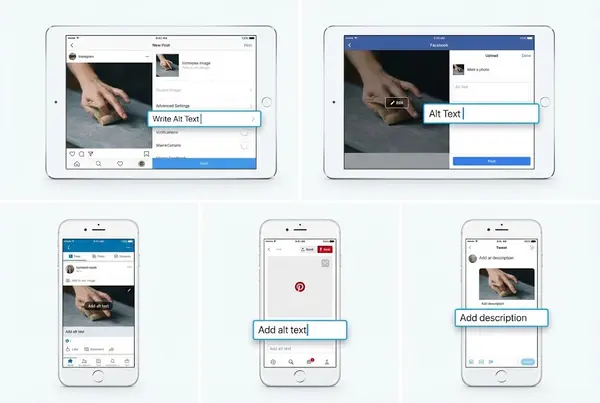
Each social media platform handles alt text differently, so your approach should adapt accordingly.
Instagram
When creating a post, tap "Advanced Settings" and select "Write Alt Text." You can manually override Instagram's auto-generated descriptions with custom text that reflects your brand voice and includes strategic keywords.
Facebook
Facebook auto-generates alt text but allows manual edits. Click "Edit Photo" and select "Alternative Text" to customize. Use this space to reinforce the post's message and improve algorithmic understanding.
LinkedIn
LinkedIn provides an alt text field when uploading images. Since LinkedIn is a professional network, use alt text that emphasizes industry relevance and expertise. Example: "Infographic showing 2026 SEO trends with data from Search Engine Journal."
Pinterest
Pinterest is essentially a visual search engine, making alt text critical for discoverability. Write descriptions that include searchable keywords Pinterest users would type: "modern minimalist home office design with natural lighting."
Twitter/X
Enable alt text in accessibility settings, then add descriptions when attaching images. Twitter's 1,000-character alt text limit offers plenty of room for detail—use it wisely.
Common Alt Text Mistakes to Avoid
Even well-intentioned creators make alt text errors that undermine effectiveness. Watch out for these pitfalls:
Keyword Stuffing
Writing "luxury eyewear luxury glasses designer frames high-end eyewear" signals spam, not quality. Use keywords once, naturally.
Neglecting Decorative Images
If an image is purely decorative and adds no content value, use null alt text (alt="") so screen readers skip it. Not every image needs a description.
Forgetting Carousels
Each slide in an Instagram or LinkedIn carousel deserves unique alt text. Don't leave them blank or repeat the same description for every image.
Auto-Relying on Auto-Generated Descriptions
Instagram and Facebook offer automatic alt text, but these descriptions are basic and often inaccurate. Always customize them.
Ignoring Mobile Users
Most social media engagement happens on mobile devices, where images may load slowly or not at all. Alt text ensures mobile users still get your message.
The Competitive Advantage You're Missing
Here's the uncomfortable truth: your competitors probably aren't using alt text either. According to WebAIM's 2024 accessibility report, only about 50% of images on the web include alt text, and much of that text is poorly written or generic. That means a small investment in alt text can yield disproportionate returns.
By consistently adding thoughtful alt text to your website and social media images, you're signaling quality to algorithms that reward thoroughness. You're also differentiating your brand as inclusive and detail-oriented—attributes that resonate with modern consumers who expect more from the brands they support.
Whether you're a luxury brand, a SaaS agency, an optical business, or a bridge influencer, alt text is a low-effort, high-impact tactic that compounds over time. Every image you optimize becomes a discovery point, a ranking signal, and an accessibility win.
Implementing Alt Text Across Your Digital Ecosystem
Making alt text a habit doesn't require overhauling your workflow. Here's how to integrate it seamlessly:
Website Images
Use your CMS (WordPress, Squarespace, Shopify, etc.) to add alt text to every image. Most platforms include an alt text field in the image upload interface.
Social Media Posts
Create a checklist for each post: Write caption, select hashtags, add alt text. Making it part of your routine ensures consistency.
Batch Content Creation
If you schedule posts in advance using tools like Hootsuite or Buffer, write alt text during your batching sessions. It's easier to do it all at once than retroactively.
Team Training
If you work with a team, make alt text a required deliverable for designers, photographers, and content creators. Build it into your brand guidelines.
Audit Existing Content
Conduct quarterly audits of your website and social profiles to identify images missing alt text. Prioritize high-traffic pages and posts with strong engagement.
Alt Text and the Future of Search
As AI-powered search experiences like Google's SGE (Search Generative Experience) and ChatGPT's browsing capabilities become mainstream, text-based context will matter more than ever. These systems synthesize information from multiple sources, and alt text provides critical context that helps AI understand and reference your visual content.
Additionally, voice search continues to grow. When users ask Alexa or Siri to find information, voice assistants rely on text signals—including alt text—to understand and retrieve relevant content. Optimizing your images now positions you to capture voice search traffic as it scales.
The trajectory is clear: the web is becoming more multimodal, and the brands that provide comprehensive, accessible, context-rich content will dominate discoverability.
Your Action Plan: Start Today

Implementing alt text doesn't require technical expertise or major resources. Here's your step-by-step action plan:
Audit Your Current Content: Review your website and last 20 social posts. How many images have alt text? How many descriptions are generic or missing?
Create an Alt Text Template: Develop a simple formula for your brand. Example: [Subject] + [Key Detail] + [Context]. "Handcrafted titanium eyeglass frames displayed on reclaimed wood shelf in natural sunlight."
Add Alt Text to New Posts: Make it non-negotiable. No image goes live without alt text.
Backfill High-Priority Content: Start with your most popular website pages and social posts. Update alt text where it's missing or inadequate.
Train Your Team: Share this guide with anyone who creates or posts visual content for your brand.
Track Results: Monitor Google Search Console for image search traffic. Watch Instagram Insights for changes in reach and engagement.
Final Thoughts
Alt image text isn't glamorous. It doesn't come with flashy visuals or instant gratification. But it's one of those foundational practices that separates brands who grow consistently from those who plateau. It's the digital equivalent of compound interest—small deposits that accumulate into significant returns over time.
Whether you're optimizing your website for Google, building an engaged community on Instagram, or positioning yourself as a thought leader on LinkedIn, alt text is your behind-the-scenes ally. It speaks to algorithms on your behalf, expands your audience, and reinforces your commitment to quality and accessibility.
The question isn't whether you can afford to prioritize alt text. It's whether you can afford not to.
About the Author
Tracey Bauer is an SEO Specialist and Digital Marketer with deep expertise in luxury brand strategy, optical industry marketing, and AI-powered content solutions. As the founder of Lens on Luxury and Lens on Social AI, Tracey helps businesses streamline operations, enhance digital presence, and scale using automation and intelligent content creation. Based in the San Francisco Bay Area, she speaks regularly at marketing and SaaS agency events on topics ranging from multi-platform SEO to AI marketing assistants. Connect with Tracey to explore how strategic SEO and accessibility can transform your digital performance.
Ready to elevate your digital strategy? Contact Lens on Luxuryto schedule a consultation.
FAQ SECTION
1. What is alt image text and why does it matter?
Alt text (alternative text) is a written description of an image that helps search engines and social media algorithms understand visual content. It's critical for SEO, accessibility, and improving content reach across platforms like Google and Instagram.
2. How does alt text improve SEO rankings?
Alt text helps Google understand image content, making it more likely to rank in Google Image search results. Since images with optimized alt text signal content relevance, they contribute to better overall page rankings and increased organic traffic.
3. Does Instagram's algorithm actually read alt text?
Yes. Instagram uses image recognition technology combined with custom alt text to categorize content and determine which users should see your posts. Well-written alt text improves discoverability, Explore page placement, and overall reach.
4. Should I use alt text for every Instagram post and carousel?
Absolutely. Each image in a carousel can have unique alt text, giving Instagram multiple signals about your content. Skipping this step means you're relying on auto-generated descriptions that are often generic or inaccurate.
5. How long should alt text be?
Aim for 125 characters or fewer for optimal screen reader performance, though Instagram allows up to 100 characters and some platforms support longer descriptions. Be concise but descriptive, focusing on the most important visual elements.
6. Can I include keywords in alt text without being penalized?
Yes, as long as keywords are used naturally and contextually. Avoid keyword stuffing (repeating terms unnaturally), which both users and algorithms recognize as spam. Describe the image authentically while incorporating relevant terms.
7. What's the difference between alt text and image captions?
Alt text is hidden code read by screen readers and algorithms, while captions are visible text displayed alongside images. Both serve different purposes: alt text describes what's in the image, while captions provide context, commentary, or calls to action.
8. How do I add alt text to Instagram posts?
When creating a post, tap "Advanced Settings" at the bottom of the screen, then select "Write Alt Text." You can manually override Instagram's auto-generated description with custom text that better reflects your content and includes strategic keywords.